Assistive Technology for Cognitive Support
Any tool that an individual can use to increase their independence in daily, thinking-based activities can be considered an external cognitive aid. These include both low- and high-tech options. For example, someone with a memory impairment may benefit from documenting daily events to refer to later. This can be done with pen and paper in a journal (low-tech) or in a specialized photo journal app on their smartphone (high-tech). High-tech supports can be accessed on an individual’s smartphone or tablet. These include applications and features that are built into the device as well as third-party apps downloaded from an app store.
The following are examples of external cognitive aids that can support a wide range of cognitive needs. Select a link to go to the relevant section below.
• Memory
• Planning/Organization
• Time Management
• Routines
• Medication Management
• General Accessibility Options
• Phone/Tablet Safety Recommendations
Memory
Individuals with memory impairments can have difficulty remembering previous events and their details, day-to-day tasks and responsibilities, and things that will happen in the future.
Low-tech supports
- Keeping a physical memory journal, with event descriptions (day, time, people, place) and details.
- Writing reminders on sticky notes throughout the house. For example, a note on the door that says: “Remember to grab your keys!”
High-tech supports
- Notes apps: Phones and tablets typically have a notes app built into the device. These apps usually support the organization of notes by date, topic, etc. It is helpful to review notes daily to support the retrieval of these events from memory. Notes can also be used to make lists, such as “Things to Do” or “Groceries Needed From the Store,” and can be checked off as tasks are completed.
- Photo and camera apps: Taking photos throughout the day to later reference can support remembering events and key details. Some photo apps also allow you to write a caption about the event. Just like notes, it is helpful to review photos taken at the end of each day.
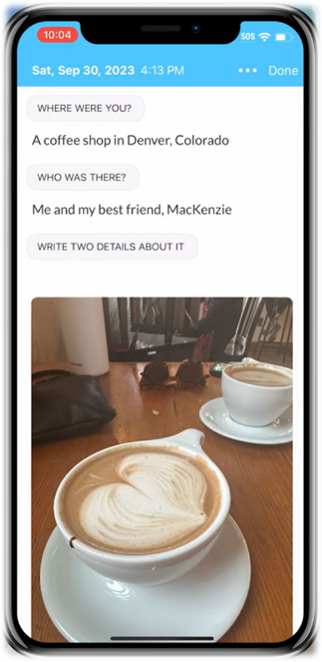 Third-party apps: There are many third-party apps that use a combination of notes, journaling and photos for supporting memory in a more structured and organized way, such as:
 - Smart speakers: These devices are activated by voice and provide verbal responses. For individuals who require orientation support (what day it is, where they are, etc.), smart speakers such as Amazon Alexa and Google Home can be used to answer these questions. The Reminder and Alarm features can be used to help a person remember tasks that need to be completed in the future. External calendars can be linked to these devices as well so that events can be accessed by voice.
Planning and Organization
People with and without brain injuries use tools to keep up with their busy schedules. Creating and keeping track of a schedule can be even more challenging for someone with a brain injury.
Low-tech supports
- Keeping a paper calendar (such as in a personal planner, desktop calendar, large whiteboard calendar, etc.) provides space for an individual to write down important events to refer to later. When possible, it can be helpful to keep the calendar in a shared space so that primary caregivers can also add and refer to the calendar.
- Creating lists can provide more structure for various tasks, including grocery shopping, household chores, packing, etc.
High-tech supports
- Digital calendar apps allow one to document upcoming events as well as look back on previously scheduled ones.
- Most digital calendars provide users with the option to set up notifications (visual and/or auditory) before and/or at the time of an event.
- Online calendars make it easier for multiple people to have access to one calendar with real-time updates. This can allow caregivers access to see and edit the same calendar on their own devices.
- These include built-in smartphone calendars such as Google Calendar and iCloud Calendar as well as third-party, simplified calendar options, including (but not limited to):
- Checklist apps are designed to create lists with checkboxes for easy tracking of task completion. These apps often have the ability to create subtasks, input information in various ways (typing, drawing, adding photos, etc), set reminders/notifications, reference completed tasks, and share lists with others via the cloud.
- These include built-in apps such as Apple Notes, Google Keep, Google Tasks and iCloud Reminders, as well as third-party apps such as (but not limited to):
Time Management
Time management is an essential executive functioning skill if someone wishes to increase their independence.
Low-tech supports
- Setting timers during time-sensitive tasks (e.g., kitchen timers while preparing meals).
- Preparing for tasks by determining how long each portion of the task will take prior to starting. For example, the task of getting ready in the morning:
- Shower: 5 minutes
- Getting dressed: 3 minutes
- Brushing teeth: 2 minutes
- Breakfast: 20 minutes
- Therefore, at least 30 minutes need to be allotted for this task.
High-tech supports
- Clock app: Smart devices all have Clock apps which include timers and alarms that can be used to keep track of time and provide reminders throughout the day.
- Alarms can be set to repeat, which is useful for events that happen daily (e.g., taking pills at noon every day). They can also have a label to remind you what the alarm is for.
- Smart speakers: These devices allow you to set timers and alarms via your voice. Smart speakers can be placed in multiple rooms in your home and linked so that alerts are heard even if you move locations.
- AI tools: Some artificial intelligence platforms offer search engines specifically designed to support neurodivergent individuals in performing executive functioning tasks. One example of this is the app and website Goblin Tools, which provides the following functions:
- Compiler: Turns a narrative about what needs to get done into a list of concrete tasks.
- Estimator: A tool that helps you to estimate the amount of time an activity is going to take you.
- Magic ToDo: Breaks down a task into detailed, chronological steps.
Routines
Daily routines involve many steps, which can make them complicated and difficult to accomplish for individuals with a brain injury.
Low-tech supports
- Create a list of steps that it takes to complete a routine and post it somewhere relevant. For example, posting a morning routine list on the bathroom mirror. Lists can be as broad or as specific as needed, depending on the individual’s support needs.
High-tech supports
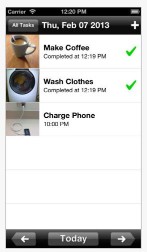 Photo apps: For people with limited reading ability, digital photo albums can be created with pictures of routine steps to scroll through for building independence in performing daily routines.
- Third-party apps: Various apps exist that provide templates for routine support. They include options for written, auditory, and/or photo/video steps.
Medication Management
Due to memory and/or executive functioning impairments, as well as novel medications following a brain injury, remembering and managing medication schedules is often an area in need of support.
Low-tech supports
- Pill boxes with organized slots for days of the week and/or time of day
- Written reminders and/or checklists to keep track of medications taken
High-tech supports
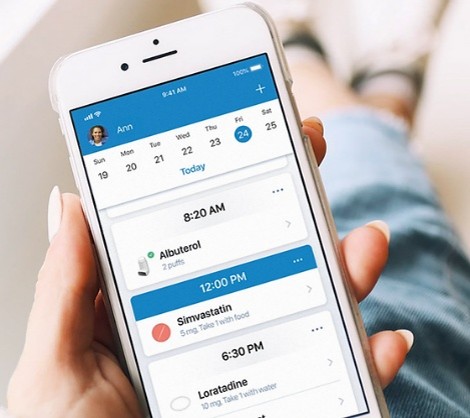 Medication management apps: These apps provide options to store information (shape, size, color) about particular medications and their purpose, set administration reminders, and allow the user to keep a list of all of the medications they are taking in one place (useful for doctor’s appointments!). Examples include the Apple Health and Medisafe apps.
General Accessibility Options
Accessibility settings within various technology hardware and software allow for a wide range of support for individuals with brain injuries. The following are general accessibility settings to look for on devices such as smartphones, tablets and computers.
Font size and color | Individuals with visual impairments can benefit from increased font size and font colors that contrast appropriately with background colors. |
Background color and screen layout | Plain or high-contrast backgrounds can make applications easier to see. Limiting or spacing app placement can allow for easier access. Use of widgets can also be beneficial. |
Speech-to-text | Speech-to-text allows the user to talk into the device’s microphone to make text appear. Useful for individuals who have difficulty spelling and/or typing. This feature is integrated into most smart device keyboards. Look for the microphone icon. |
Text-to-speech | Those with reading impairments may benefit from text-to-speech, which reads aloud written text for easier comprehension.
|
For specific accessibility options available on one’s personal technology, please refer to that platform’s “settings” options or reach out to the manufacturer for assistance.
Phone and Tablet Safety Recommendations
Following a brain injury, it is important to consider the following in regard to phone and tablet use in order to promote safety and support recovery. The following recommendations are most useful in the early stages of recovery, but can be a good guiding tool as recovery continues.
Note: Capabilities for applying limits and restrictions vary by device and are frequently being updated. For the most up-to-date information on what can and cannot be limited on a given device/operating system, visit:
- Android: Google Family Link
- Apple iOS: Screen Time for iPhone, iPad or iPod Touch
Considerations for Phone and Tablet Use Following Brain Injury
Contacts
- Consider limiting contacts to only those who are necessary to communicate with at this time (family, close friends, emergency numbers, etc.).
- Limiting contacts to your “VIPs” can prevent overstimulation from too many incoming messages and/or prevent outgoing communication with people who may not be informed of the user’s current situation.
Social Media
- Consider deleting or limiting social media apps until further on in the recovery process. This allows for:
- Fewer distractions and overall decreased screen time
- Prevention of accidental posting or unintended communication via social media apps
- Protection against potential scammers reaching out over social media
Notifications and Visual Clutter
- Most smartphones can be overstimulating and distracting with the number of notifications that can pop up, as well as the number of apps on the screen.
- Consider reducing the number of apps on the home screen and organizing the ones that remain.
- Turn off all unnecessary notifications within the phone’s settings.
Banking Apps and Online Purchases
- If inappropriate online purchases or the ability to handle finances is a concern, delete all banking apps off of the phone, including:
- Direct banking apps (Apple/Google Wallet, Chase, Wells Fargo, etc.)
- Money transferring apps (PayPal, Venmo, etc.)
- Shopping apps (Amazon, eBay, etc.)
- Food delivery apps (Door Dash, Uber Eats, etc.)
- Any app that contains credit card information should be deleted, or the credit card information should be removed from the app. Note: Credit card information can also be saved in web browsers, such as Google Chrome.
Screen Time
- Limiting screen time is a good idea for anyone, especially those recovering from a brain injury.
- Limit screen time using external tools (e.g., setting a timer or having a caregiver hold the phone during certain hours) or settings within the smartphone itself.
The Tech Lab offers these resources for educational purposes and does not endorse any products, including those mentioned on this site. Many others are available. Please check online for additional products, manufacturers and user reviews.